Appearance
iFrame container style recommendations
INFO
NOTE: These recommendations apply only to iFrame integration and are not applicable to Shadow mode.
To ensure correct display on desktop and mobile devices, apply the following styles to the iFrame container:
Desktop
The picture below illustrates an incorrect desktop display:

To fix the desktop display, add the following CSS styles to your container:
javascript
height: calc(100vh - (N)px); // (N) is the height of your headerAt this point, the desktop display is fixed:

javascript
.iFrame-container: { height: calc(100vh - 50px) }Mobile
The picture below illustrates an incorrect mobile display:
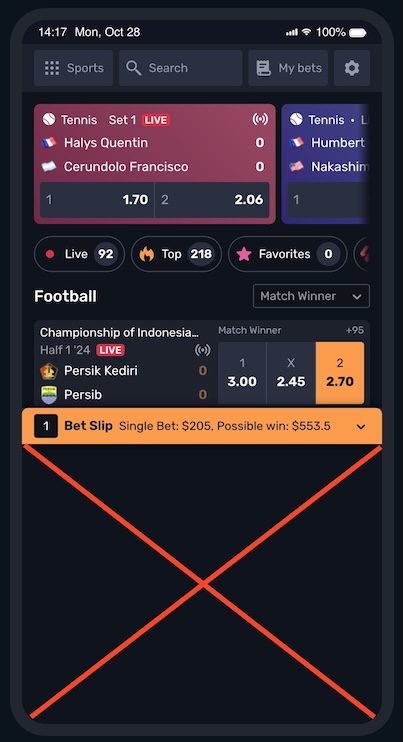
To fix the mobile display, follow the steps below:
INFO
NOTE: Since the CSS “vh” height value units are different for mobile devices, it is required to specify the device’s screen height units.
In the example below, we use the --vh variable. For the latest iPhone models, consider the non-working area at the bottom of the screen (safe-area-inset-bottom).
javascript
(function () {
    const setVh = () => {
        const vh = window.innerHeight * 0.01;
        document.documentElement.style.setProperty('--vh', `${vh}px`);
    };
    let orientationTimeout = null;
    const onOrientationChange = () => {
        const delay = 250;
        clearTimeout(orientationTimeout);
        orientationTimeout = setTimeout(setVh, delay);
    }

    window.addEventListener('orientationchange', onOrientationChange);
    setVh();
})();CSS styles for mobile iFrame container can look this way:
javascript
.iFrame-container {
  // define variable for iphones
  --safe-area-inset-bottom: env(safe-area-inset-bottom);

  // --vh - is a viewport
  // (N) is the height of your header
  // (X) is the height of your mobile bottom navigation bar, if present.
  height: calc(var(--vh, 1vh)*100 - (N)px - (X)px - var(--safe-area-inset-bottom));
}At this point, the mobile display is fixed:

javascript
.iFrame-container {
    --safe-area-inset-bottom: env(safe-area-inset-bottom);
    height: calc(var(--vh, 1vh)*100 - 75px - 50px - var(--safe-area-inset-bottom))
}