Appearance
Backend integration
Sportsbook server will communicate with your API server using https://{PARTNER_API_URL} as base URL. In order to configure {PARTNER_API_URL} you should tell it to your Account Manager.
You'll need to implement the following endpoints on your side to be able to integrate Sportsbook:
When you receiving a request from us we are expecting one of the following responses:
- Success: A response with HTTP status code
200and the requested payload in the body. - Error: A response with HTTP status code
400and the body containing an error code, e.g.{ "code": 7, "message": "Not enough money" }. - Error: A response with HTTP status code other than
200. - Error: You have not responded within a 5 seconds timeout.
All requests will be signed. You'll need to validate that signature before trusting the data in the request. You can find more information on the request signing page.
Some of the requests (user data, user balance and bet) will require you to validate a token that you've passed during frontend SDK initialization. This allows you to identify a user and decide whether the request can proceed.
The rest of this document will briefly overview each request type in relation to the user flow on our product.
Initialization
When the user opens Sportsbook Iframe the frontend performs initialization. During this stage we will issue a user data request following by user balance request.
Let's say user's initial balance is $20.
Placing a bet
Now our user decides to place a $5 bet. We are sending corresponding Place bet request to your backend:
json
POST /payment/bet

{
  "type": 1, // this field and the POST method identifies a place bet request
  "amount": 5, // this is the amount the user must be charged
  "coefficient": 2,
  "currency": "USD",
  "transactionId": "b26153f9-ef3a-4768-b6c8-0861acdecb7a",
  // other fields
}During this request your backend should deduct bet amount from user balance. So the updated user balance will look like this $20 - $5 = $15.
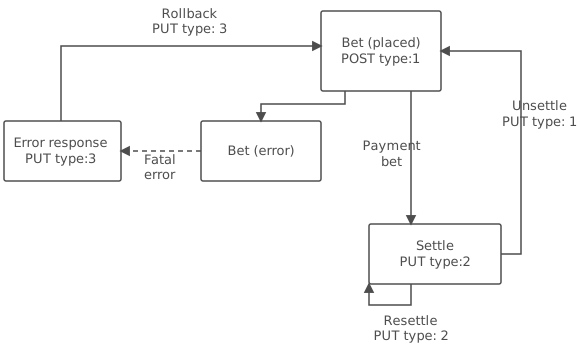
Note that if your service will fail to process our request or there will be some other network issue at this stage (e.g. request timeout or status code other than 200) we will issue a Rollback request to notify you that we have rejected the bet with
transactionIdbecause of errors. The request will look like this:PUT /payment/bet { "type": 3, "transactionId": "b26153f9-ef3a-4768-b6c8-0861acdecb7a", ... }.
Settling a bet
After some time our system will receive results for a match the user bet on. We will settle the bet and inform you with Settle request:
json
PUT /payment/bet

{
  "type": 2, // this field and PUT method identifies a settlement request
  "amount": 10, // this is the amount the user should receive
  "coefficient": 2,
  "currency": "USD",
  "resultType": "won", // wow. some one was lucky today
  "transactionId": "b26153f9-ef3a-4768-b6c8-0861acdecb7a",
  // other fields
}This request states that the user have won, you should pay him $10 as a reward. In case of lost the amount will be zero meaning that you should not issue any payouts.
As a result of processing the request your backend should update the user balance to $15 + $10 = $25.
Additional Settle and Unsettle requests
Normally Settle request should be a final in a bet lifecycle. However in some cases you can receive additional settle requests because of following reasons:
- we are retrying request because of timeout or some other network issue. So if you receiving the same request as you already processed you can safely skip it.
- the first result was incorrect and we are sending an updated result. In this case you should revert the previous payout transaction and re-apply the new one based on the request data.
So for example if you are receiving the following request:
json
PUT /payment/bet

{
  "type": 2,
  "amount": 5,
  "coefficient": 2,
  "currency": "USD",
  "resultType": "refund",
  "transactionId": "b26153f9-ef3a-4768-b6c8-0861acdecb7a",
  // other fields
}The user balance should change to $25 - $10 + $5 = $20 (first we are deducting previous $10 won settlement and then applying the amount from current refund settlement).
In rare cases it can also be a need to undo previous bet result. So that the bet will return to the "waiting for a result" state. In such cases we will send a separate Unsettle request:
json
PUT /payment/bet

{
  "type": 1, // the same type as for settlement request but the method is PUT
  "amount": 5,
  "coefficient": 2,
  "currency": "USD",
  "transactionId": "b26153f9-ef3a-4768-b6c8-0861acdecb7a",
  // other fields
}When you receiving such request you should ensure that your system have canceled the payout if it was already done.
Now returning to our user. Previously we have processed "refund" settlement and now we are received Unsettle request. So the balance should change to $20 - $5 = $15. The bet is switching back to the "waiting for a result" state.
Payment Flow
The flowchart below represents the connections between all previously described requests: